 author
A consumer TV can show videos, images, menus, and promotions, so it can look like the cheaper choice for a business wall. The difference appears after the screen starts working every day. Wall mounted digital signage is built around commercial schedules, remote content updates, flexible installation, and long operating hours. If you need a customer-facing screen in a store, hospital, hotel, office, school, or transport site, those details matter more than the price tag alone.
A commercial digital signage display also saves floor space. For businesses that change promotions often or manage several locations, a wall mounted digital signage display is usually the more practical choice.

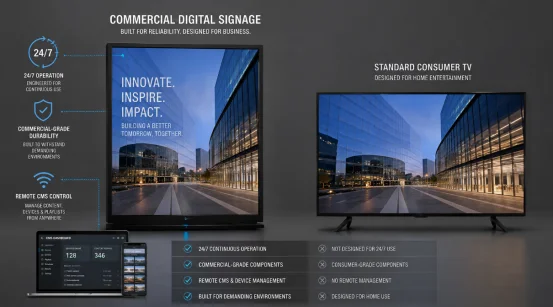
The simplest way to compare wall mounted digital signage vs consumer TV is to look at the job each screen must do. A TV is mainly designed for home viewing. A commercial LCD display is designed for public information, advertising, and longer daily use.
| Factor | Wall Mounted Digital Signage | Consumer TV |
| Main use | Advertising and public information | Home entertainment |
| Daily operation | Long-hour and 24/7 options | Lighter household schedules |
| Content updates | USB or remote publishing | Usually manual |
| Orientation | Landscape and portrait | Usually landscape |
| Multi-screen control | Available | Limited |
| Initial cost | Higher | Lower |
This is why digital signage vs consumer TV is not only a picture-quality question. It is also an operations question.
A wall mounted advertising display fits dynamic media. It runs on set schedules. Plus, it stays powered all day. These commercial models easily handle 1080P or 4K resolution. They support scheduled power control and split-screen playback. They also feature remote publishing and batch device management.
Built for Long Operating Hours
A 24/7 digital signage display fits busy locations. The screen works from open to close. Or, it runs continuously. Commercial advertising machines handle continuous 24/7 operation flawlessly. Their service life reaches at least 50,000 hours.
Finished units face at least 48 hours of continuous high-temperature aging tests. Checks cover brightness, contrast, color consistency, interface stability, heat dissipation, and power cycling. This definitely matters when a screen sits above a checkout counter daily.
Listed brightness is 300 to 500 cd/㎡ for indoor advertising machines and 800 to 1500 cd/㎡ for outdoor versions, depending on configuration. A 178° viewing angle helps when customers approach from different directions.
Portrait digital signage works well for posters, directories, menus, and narrow wall areas. Commercial units can also use landscape layouts.
Digital signage content management becomes important once you have several screens. Networked systems can publish material remotely, monitor device status, schedule content, and troubleshoot without sending staff to each screen.
This matters for digital signage for retail. Chain-store projects can use wall-mounted screens for unified remote publishing and real-time promotion updates. A price change across dozens of stores makes remote management feel less like an extra feature and more like basic plumbing.
The purchase price often favors a TV. The longer-term picture can differ. When comparing commercial display vs consumer TV, consider operating hours, content changes, maintenance time, and downtime.
A digital signage display vs TV comparison should include staff time. If someone must visit each display with a USB drive, the hardware may be cheap but the workflow is not. Remote publishing and centralized monitoring reduce repeated manual work.
The same logic applies to commercial display vs TV in a multi-site rollout. Replacement, extra media hardware, mounting changes, and support all affect total cost of ownership.
A consumer TV for digital signage can be reasonable when you have one indoor screen, use it only a few hours each day, rarely change content, and do not need portrait installation or centralized control.
Using a TV for digital signage becomes less attractive when the screen faces customers every day or carries time-sensitive information. If downtime affects sales, wayfinding, queue information, or guest service, a purpose-built digital signage screen gives you more control.
Commercial screens are useful where floor space is tight and information must stay visible. Common applications include retail, transportation, healthcare, hotels, restaurants, education, government, and office settings.
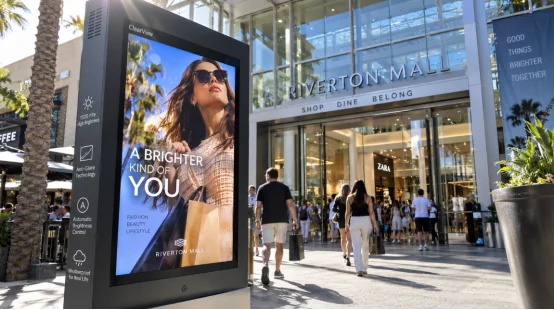
In retail, wall mounted digital signage can show promotions, prices, videos, and product information. Hotels can update room rates, dining information, events, or guest guidance. Healthcare sites can show department information, queue updates, doctor introductions, and health notices.
Transport sites can use wall-mounted screens for schedules, route guidance, public notices, and advertising without taking up walking space.
Start with the wall, viewing distance, and daily operating schedule. Then check content control and maintenance. The right wall mounted digital signage display should fit the space and workflow, not just the budget.
Commercial display sizes span from 10.1 to over 120 inches. Pick brightness based on room lighting. Next, decide if landscape or portrait digital signage suits your media best.
Find exact interfaces your setup requires, including LAN, RS232, HDMI, and USB. Running multiple monitors? Always verify essential digital signage content management tools. These include remote publishing, timed playback, batch control, and device monitoring.
Also ask what happens after installation. A commercial project may need remote diagnostics, spare parts, software updates, or on-site support. These details seem boring during purchasing. They become very interesting when a screen goes dark on a busy day.
Once wall mounted digital signage makes sense, the next question is whether the supplier can support the deployment rather than simply ship a screen.
RSXD focuses on commercial LCD display equipment and integrated display solutions. Its wall-mounted range supports horizontal or vertical installation, remote publishing, split-screen playback, intelligent power control, and configuration changes for screen size, brightness, touch, interfaces, and software needs. Its production process includes aging tests and full-machine inspection, with ISO9001 quality management and CE, FCC, and RoHS compliance for relevant products.
For custom or multi-location projects, RSXD commercial display solutions can also cover hardware, software, installation, remote management, and maintenance. That combination matters when your real concern is stable operation after deployment.
Q1: Can you use a regular TV for digital signage?
A: Yes, for light indoor use without remote management. For long-hour customer-facing use, a commercial digital signage display is usually a better fit.
Q2: Can wall mounted digital signage run 24/7?
A: Commercial models can support continuous operation. The advertising machine specifications used here include 24/7 operation.
Q3: What is the main difference between digital signage vs consumer TV?
A: Digital signage is built around commercial operation, remote content control, flexible orientation, and longer daily schedules. A consumer TV is mainly designed for home entertainment.
Q4: Does wall mounted digital signage support remote updates?
A: Yes. Network versions can publish videos, images, text, and scheduled content remotely. Some systems also support device monitoring and batch management.
Q5: Is wall mounted digital signage better for multiple stores?
A: Usually yes. Centralized publishing lets you update promotions across many locations without visiting every screen, reducing routine operating work.