 author
Picking an interactive flat panel size is not just about finding the biggest screen for your money. The smart choice relies on the person sitting furthest away. Room shape and wall height matter too. You must also count your students and consider the files you show. A 55 inch interactive panel fits great in a small study space. However, an 86 inch interactive flat panel helps a big class see things easily. The ideal interactive flat panel size keeps words, writing, and videos sharp for all. It also avoids setup headaches.
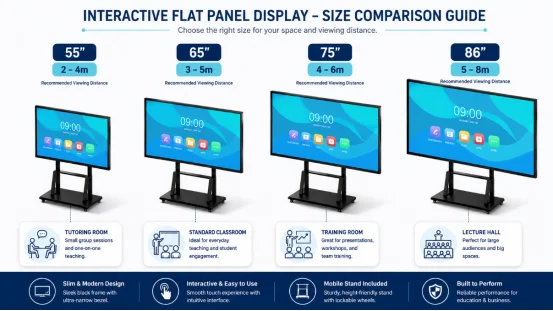
Always look at the back row first. Floor space offers a basic clue. Yet, interactive panel viewing distance shows if kids can truly read the notes. A deep, thin room might demand a bigger display. This is true even if a square room has the exact same total space.
| Panel Size | Suitable Room or Use | Planning Viewing Distance | Typical Group |
|---|---|---|---|
| 55 inch | Tutoring room, small huddle room | About 2–4 m | 2–8 people |
| 65 inch | Standard classroom, small meeting room | About 3–5 m | 6–15 people |
| 75 inch | Training room, medium classroom | About 4–6 m | 12–25 people |
| 86 inch | Large classroom, boardroom, lecture room | About 5–8 m | 20–40+ people |
These are practical starting ranges for 16:9 4K content, not fixed rules. The smallest text your viewers must read matters more than a simple diagonal measurement. Before you order, display a real lesson slide, spreadsheet, or meeting document and check it from the back row.
Measure the usable wall width, ceiling height, doors, windows, lights, and furniture. Leave room around the panel for ventilation and service access. A 75 inch interactive whiteboard may fit the wall but block a cabinet, projector, or emergency route. A smaller screen can be the better choice if the room has limited wall space.
Side seats matter too. A panel that looks clear from the center may appear less comfortable from an angled seat, especially when the room has strong window light. An anti-glare, low-reflection surface helps reduce this problem. RSXD lists AG anti-glare and AR low-reflection technology among the important commercial display features to check.
Your farthest viewing distance should guide the first size decision. Measure from the panel surface to the last seat, then test the content viewers use every day. If students read small labels on maps or teachers write detailed equations, choose more screen area than you would for simple video playback.
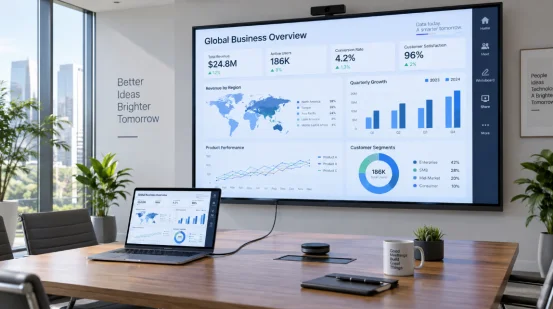
A 65 inch interactive display often suits a small conference room with close seating. It leaves more wall space for cameras, speakers, and a side display. A 75 inch model is usually more comfortable when participants sit farther away or review dashboards, contracts, and split-screen documents.
For a room with 15 or more participants, 75 inches gives you useful breathing room. If the farthest seat is near 6 m, an 86 inch model may be worth considering. Still, check the lift, corridor, doorway, bracket rating, and service clearance before selecting it.
A meeting based on large charts can work on a smaller screen. Dense spreadsheets, engineering drawings, lesson diagrams, and multi-window collaboration need more space. Touch accuracy also matters when several people write together. High-end interactive panels may offer 20-point touch and around 10 ms response, but you should verify those values on the exact model.
Not always. An 86 inch interactive flat panel can suit a large classroom or lecture-style room where the back row needs comfortable text visibility. The trade-off is practical: the panel is heavier, needs a stronger mounting solution, and may be harder to move through corridors and elevators.
The mounting height should let seated students see the lower part of the screen while allowing the teacher to write comfortably. Check sightlines over desks and front-row heads. A height-adjustable trolley can help when the room serves different age groups, but the trolley must support the panel weight and remain stable during touch use.
Also check the camera and speaker positions. A large panel should not force the camera too high or leave the microphone behind the presenter. These small details affect daily use more than a few inches of diagonal size.
Use this short site-check process:
This process prevents two common mistakes: buying too small for the back row or buying too large to install safely. It also gives you a clear specification for a quotation.

Screen size solves visibility, but it does not solve every classroom or meeting problem. Check 4K resolution, touch response, writing accuracy, wireless screen projection, video conferencing support, operating system compatibility, remote management, and warranty terms.
RSXD’s interactive teaching and conference products mix touch control, annotation, wireless casting, and video conferencing functions. They make displays from 10.1 inches to over 120 inches. This huge range fits your exact room. You never have to settle for one basic size.
The brand holds ISO9001 quality management, CCC, CE, FCC, and RoHS certifications. Each item also passes at least 48 hours of finished-product aging tests.
Running many sites? Remote management, installation, training, and after-sales support matter a lot. These services help just as much as the panel diagonal.
You can review the interactive flat panel display solutions and the wider commercial display capabilities before requesting a room-based recommendation. Ask for the selected model’s actual dimensions, weight, active area, touch specifications, mounting plan, and current warranty.
Q1: What size interactive flat panel is best for a classroom?
A: A 65 inch interactive display suits many standard classrooms. Choose 75 or 86 inches when the farthest seats are several meters away or the content contains small text.
Q2: How far should you sit from an interactive flat panel?
A: Use the farthest seat as your reference. As a starting point, 65 inches often suits about 3–5 m, while 75 inches suits about 4–6 m. Test real content before ordering.
Q3: Is a 65 or 75 inch interactive display better for a conference room?
A: Choose 65 inches for close seating and limited wall space. Choose 75 inches when more people need to read documents, dashboards, or split-screen content.
Q4: Is an 86 inch interactive flat panel too large for a classroom?
A: It can be excessive in a small room, but it works well in large classrooms and lecture rooms. Confirm wall strength, delivery access, viewing angles, and mounting height first.
Q5: What should I measure before buying an interactive flat panel?
A: Measure the farthest viewing distance, usable wall width and height, seating layout, smallest required text, power and cable routes, wall strength, and the complete delivery path.