 author
The interactive flat panel vs interactive whiteboard choice affects picture quality, lesson setup, repairs, and student participation. If you are comparing an interactive flat panel for classroom use with an interactive whiteboard for classroom teaching, ask this: how many devices must work before class can begin?
The main difference between interactive flat panel and interactive whiteboard systems is simple. A traditional board usually depends on a projector and computer. An interactive flat panel display combines the LCD screen, touch layer, speakers, whiteboard tools, and connectivity in one unit.
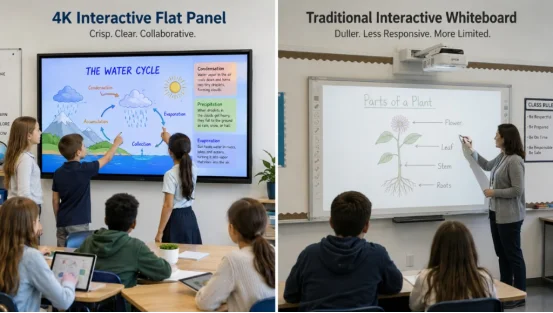
Both let you write, annotate, and control content by touch. The hardware is quite different. You notice it at 8:05 a.m. when the projector cannot find the laptop.
A projector-based interactive whiteboard uses a touch-sensitive board, projector, and external computer. Image quality depends on projector resolution, lamp condition, alignment, and room light.
An interactive display for education is a direct-view classroom touch screen. It can run whiteboard tools from a built-in system and may accept an optional computer module. There is no projector shadow or alignment step.
| Area | Interactive Whiteboard | Interactive Flat Panel |
|---|---|---|
| Display | Projected image | Direct LCD image, often 4K |
| Projector | Required | Not required |
| Computer | Usually external | Built-in system, optional module |
| Touch | Varies by board | Multi-user touch and gestures |
| Bright Rooms | Can look washed out | Usually clearer |
| Maintenance | Lamp, filter, cables, calibration | Screen, touch system, software |
| Startup | Several devices | One main display |
The smart board vs interactive flat panel question is best treated as a system comparison.
For maps, small text, and science diagrams, clarity matters. The interactive flat panel vs projector-based interactive whiteboard comparison usually favors the direct LCD screen, especially in bright rooms.
A 4K interactive flat panel can show 3840 × 2160 content without a projector lamp. RSXD classroom configurations cover 400 to 600 cd/m² brightness, a 4000:1 contrast ratio, and a 178-degree viewing angle. Teaching models can also use anti-glare glass and brightness adjustment.
These interactive flat panel benefits are easy to see from the side of the room. By contrast, interactive whiteboard disadvantages may include faded images, shadows, and repeated projector adjustment. Those are common disadvantages of interactive whiteboards in classrooms. Nothing dramatic, just regular interruptions.
A multi-touch classroom display lets several students write, drag objects, or zoom content at once. RSXD education configurations include 20-point or 32-point touch, ±2 mm accuracy, and response speed of 3 ms or less.
The benefits of interactive flat panels in education become clear during group work. Two students can solve different equations while another moves labels on a diagram. A digital whiteboard for teaching can save the marked page for review.
No. The answer to does an interactive flat panel need a projector is straightforward because the LCD panel creates its own image. This removes one device, one mounting position, and several fault points.
A traditional board usually needs a projector, computer, speakers, power, and signal cables. Interactive whiteboard maintenance may include lamp replacement, filter cleaning, calibration, and cable checks.
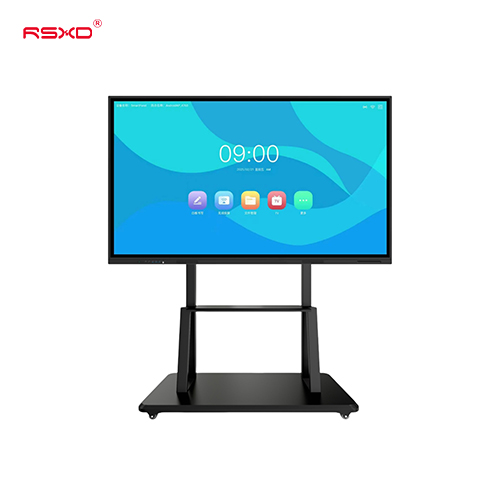
A flat panel can start from its built-in system. RSXD models support wall mounting or a mobile stand, useful when a training room changes layout more often than planned.
The Android vs Windows interactive flat panel choice depends on your files. Android suits whiteboarding, browser work, media, and light apps. A Windows module helps with desktop teaching software and complex courseware.
RSXD education configurations can support Windows 10 or 11 with Android 11, plus HDMI, USB, RJ45, Type-C, Wi-Fi 6, and Bluetooth 5.0. Wireless screen sharing for classroom use lets teachers or students present from a laptop, tablet, or phone.
Interactive flat panel cost is usually higher than the price of a board alone. That comparison can mislead you because every device needed for a working classroom has a cost.
A whiteboard budget may include the board, projector, computer, speakers, brackets, cables, and labor. A flat panel budget usually includes the panel, mount, optional computer module, camera, or microphone.
Interactive flat panel total cost of ownership includes purchase, installation, software, parts, support, and lost teaching time. A cheap cable fault still disrupts a lesson.
This is where the interactive flat panel vs interactive whiteboard decision often changes. Fewer separate devices usually mean fewer connection problems, though the screen and touch system still need care.
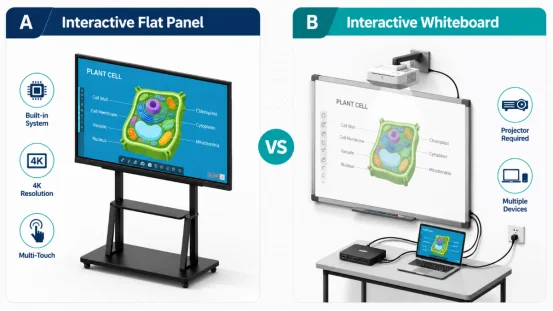
The answer depends on current equipment, room light, teaching style, and budget. When deciding between an interactive flat panel or interactive whiteboard for classroom use, do not replace equipment only because it looks old. Check how it performs.
Keep an interactive whiteboard for classroom use when the projector and computer remain dependable, lessons need basic annotation, and the room has controlled lighting. It can also make sense before a planned renovation.
Choose an interactive flat panel for classroom use when you need sharper images, quick startup, multi-user work, remote teaching, classroom recording, or fewer cables. It is often the best interactive display for classroom projects involving new construction or a full digital upgrade.
Knowing how to choose an interactive flat panel for classroom use starts with the room, not the brochure. Measure viewing distance, wall area, mounting height, and the smallest text students must read.
When asking what size interactive flat panel for classroom use is right, consider student count and the farthest seat. RSXD teaching models cover 50 to 98 inches in its education range.
Check 4K resolution, anti-glare treatment, touch points, writing response, USB-C, HDMI, network access, wireless sharing, and software support. Review interactive flat panel for classroom options before requesting a project specification.
A useful supplier should match the screen to the room, test software, plan installation, and support the equipment after delivery.
RSXD develops and manufactures commercial LCD display and touch systems, covering hardware, software adaptation, customization, production, testing, and service. Its education range supports 4K display, multi-touch writing, screen projection, annotation, remote teaching, and classroom recording. Products receive display, touch, interface, reliability, and continuous aging tests before shipment. RSXD can also adapt size, system, interfaces, installation, and software for school projects. This helps a district keep a consistent classroom setup across several buildings. More details are available on the RSXD website.
Q1: Is an Interactive Flat Panel the Same as an Interactive Whiteboard?
A: No. A flat panel is an integrated LCD touch display. A traditional interactive whiteboard usually needs a projector and external computer.
Q2: Does a Flat Panel Work With Existing Teaching Files?
A: Usually yes. Test your slide files, PDFs, browser resources, videos, and specialist software before purchase.
Q3: Is a Flat Panel Always Cheaper?
A: Not at first. Compare the full system cost, maintenance, replacement parts, and classroom downtime.
Q4: What Size Works Best in a Classroom?
A: Choose by viewing distance, student count, mounting height, and text size.
Q5: Which Is Better for Student Collaboration?
A: A flat panel with multi-touch, wireless sharing, and digital annotation usually gives students more ways to participate.