 author
Choose an outdoor advertising display for its actual setting. Storefronts, event entrances, and open public walkways differ in sun exposure, weather, viewing distance, power access, and foot traffic.
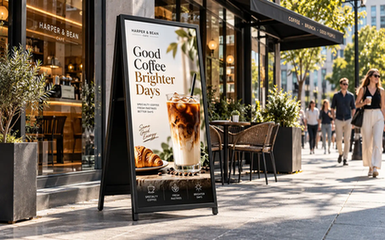
RSXD’s LCD Screen Digital Signage is a portable 43 inch A-frame for retail promotions, events, and public messaging. The page lists 1500 cd/m² brightness, IP65 protection, AG glass, a 50,000 mAh battery with up to 14 hours of operation, and optional G+G touch. It also lists Android, WiFi, Ethernet, USB, app, Internet, and cloud control. Confirm the configuration and site suitability before ordering.
| Requirement | What to check | Why it matters |
|---|---|---|
| Sunlight visibility | Brightness, contrast, reflections, viewing angle | Outdoor messages compete with direct and reflected light |
| Weather exposure | IP rating, seals, drainage, operating temperature | Rain, dust, and temperature affect reliability |
| Mobility | Wheels, footprint, lifting route, storage location | A mobile sign must be easy to position and secure |
| Power | Battery capacity, charging time, runtime, spare power plan | A bright screen is useful only while it is powered |
| Content | Text size, contrast, aspect ratio, update method | Passersby need to understand the message quickly |
| Interaction | Touch requirement and weather conditions | Touch adds value only when users can operate it comfortably |
Map normal foot traffic and note the closest, typical, and farthest points where people should read the screen. Outdoor signs often get only a few seconds, so test from farther viewing points, not just directly in front.
The listed 9:16 ratio favors a portrait layout, but the same page lists 1920 x 1080 resolution. Confirm the intended pixel canvas and rotation with RSXD before producing artwork. Then organize a short message vertically, keeping the offer and action visible in the upper and middle zones. Confirm availability first if you need landscape, another size, or a custom cabinet.
For distant viewers, use a short headline, strong contrast, and one action. Keep detailed menus and small text for close viewing; more pixels cannot fix typography that is too small.
Outdoor light changes through the day, and a shaded entrance differs from afternoon sun. RSXD lists a 1500 cd/m² high-brightness IPS panel. Use it as a starting configuration; readability still depends on sun angle, reflections, contrast, and viewing angle.
The product page lists AG anti-glare tempered glass. Test the finished creative at the actual site and time; dark photos, thin fonts, and low-contrast colors can still be hard to read.
At each regular viewing point, check whether the brand, offer, date, and call to action can be read in a few seconds. Repeat in morning and afternoon light where practical.
The product page lists an IP65 protection rating and describes protection against dust and wet weather conditions. That supports outdoor planning, but an IP rating does not remove the need for a suitable site review. Confirm how the display will be positioned, whether water can drain away, how cables are protected, and whether the charging area stays dry.
The listed operating temperature is -20°C to 70°C. Confirm the climate, direct-sun exposure, storage conditions, and charging temperature. Heat can build up around a dark enclosure, while freezing conditions can affect batteries and touch operation. Keep the service access and ventilation specified by RSXD.
For public deployment, review stability and security. Decide how the A-frame will be moved, stored, and protected after business hours. These physical details are part of outdoor advertising display selection.
If the site needs a fixed wall-mounted or floor-standing installation, compare the options in RSXD’s Outdoor Digital Display category rather than treating a mobile A-frame as the only format.
The listed configuration includes a 50,000 mAh battery, a seven-hour charging time, and up to 14 hours of operating time. Runtime depends on brightness, media, network activity, touch use, battery condition, and ambient temperature. Do not schedule a full-day campaign from the maximum figure without a charging and replacement plan.
Map the daily operating cycle, charging location, overnight storage, battery checks, and backup plan. The product page describes an independent battery, replaceable capacity, detachable charging, and integrated battery indicators. Ask RSXD to confirm these functions and available charging accessories for the final order.
Battery planning also affects placement. A sign moved through a narrow doorway or loaded into a vehicle needs a clear handling process. Include the listed 45 kg net weight in the delivery and staffing plan.
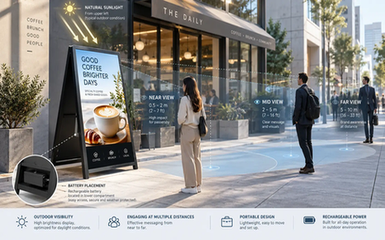
An outdoor display should answer one immediate question. Promotions need an image, price, brief benefit, and store direction; event signs need a name, time, entrance, and arrow. Avoid brochure-length copy for passing pedestrians.
Use a portrait grid that follows the listed 9:16 ratio. Keep text away from the edge, leave space for changing offers, and prepare a no-touch version for rain or gloves. Make the first video frame informative.
The listed control options include WiFi, Ethernet, USB, a WiFi app, Internet, and cloud control. Choose a method that fits the site network and team workflow. Test the path from content approval to playback, and confirm whether offline playback, schedules, monitoring, and user permissions are included.
The RSXD product page lists optional G+G capacitive touch and 10-point capacitive touch in the feature description. Touch can support product browsing, registration, maps, menus, or self-service information. It also changes the outdoor experience. Users may wear gloves, have wet hands, or avoid touching a public screen during poor weather.
Choose touch when the interaction has a clear job and the site team can keep the screen clean and usable. For a simple promotion, a large call to action and QR code may be more practical. For a wayfinding or information station, touch can justify the extra interface and software planning. Confirm the touch option, glass treatment, operating system, application compatibility, and cleaning procedure before quotation.
Before asking RSXD for a quotation, prepare the following information:
Installation location, photos, drawing, and daily exposure to sun, rain, dust, and wind.
Nearest, normal, and farthest viewing positions, plus the expected viewing time.
Available footprint, delivery route, storage area, and handling staff.
Required operating hours, charging window, and backup power plan.
Longest headline, smallest important text, media type, and content update frequency.
Need for touch, QR codes, wayfinding, remote control, scheduled playback, or cloud management.
Required network method, operating system, brightness, protection, and temperature range.
Site safety, anchoring, accessibility, cleaning, service access, and after-hours security.
This checklist makes the product discussion concrete and prevents a brightness or battery number from replacing a review of the route, audience, and content.
RSXD combines R&D, production, customization, sales, and service for commercial LCD display equipment, allowing project discussions to cover hardware, software, installation, and operation and maintenance together. Send the team the site information, viewing distances, photos, operating schedule, content examples, weather exposure, control preference, and touch requirement. RSXD can review the LCD Screen Digital Signage configuration and confirm project-specific details. Submit the project brief through the RSXD contact page to request a quotation.
It is a digital screen selected and configured for messages viewed outside, where sunlight, weather, movement, power, and public access affect the installation. Brightness alone does not make an indoor screen suitable for outdoor use.
RSXD lists 1500 cd/m² for the LCD Screen Digital Signage model. Whether it is sufficient depends on sun direction, reflections, screen angle, content contrast, and the viewing time. Test the finished creative at the site before approval.
The listed configuration has a 50,000 mAh battery and up to 14 hours of operating time, with a seven-hour charging time. Actual runtime varies with brightness, media, network activity, temperature, and battery condition.
The product page lists IP65 protection and an operating temperature of -20°C to 70°C. Confirm drainage, cable protection, storage, charging, stability, and final configuration with RSXD.
Touch is useful for browsing, wayfinding, registration, and self-service information. For a short promotion, a non-touch layout with a QR code may be easier to use in rain, cold, or busy pedestrian traffic.