 author
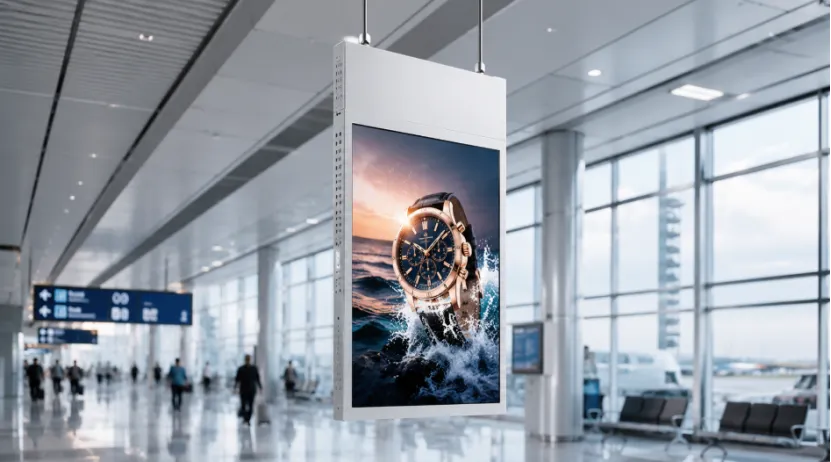
A hanging double-sided LCD advertising display is not a product you should buy only by screen size and price. For a mall corridor, retail entrance, hotel lobby, airport passage, or showroom, this kind of screen has to look good, hang safely, run for long hours, and make content updates easy.
A simple digital signage buying checklist can save you from the common problems buyers meet later: weak brightness, wrong voltage, messy cables, slow content updates, missing brackets, or packaging damage during shipping.
A B2B digital signage checklist is useful because a hanging screen is part of a project, not just a display device. You may need to match the ceiling structure, viewing distance, network environment, content plan, local voltage, and delivery schedule.
RSXD’s product page describes this display as a ceiling-mounted double-sided LCD display for high-traffic commercial spaces, with 43, 49, and 55 inch options, Android or Windows systems, Wi-Fi, LAN, optional 4G, and custom configuration support.
Start with hanging digital signage screen size. A 43 inch hanging digital signage display works better for narrow retail entrances and smaller corridors. A 49 inch double-sided LCD display suits medium mall aisles or showrooms. A 55 inch double-sided advertising display fits wider lobbies, atriums, and busy commercial passages.
Bigger is not always smarter. If the screen hangs too high, small text becomes hard to read. If it hangs too low, the display may feel heavy in the space. For many B2B projects, the safer move is to confirm the installation height first, then choose the size.
Digital signage display brightness should match the actual light, not the catalog picture. RSXD’s knowledge base lists indoor advertising display brightness at 300 to 500 cd/㎡, with outdoor or high-brightness models reaching 800 to 1500 cd/㎡. It also mentions 1080P or 4K resolution, 178° viewing angle, and long-term 24/7 operation for advertising machines.
For a normal indoor corridor, 300 to 500 nits digital signage is often enough. Near glass doors, bright shop windows, or strong ceiling lights, a high brightness digital signage display is safer. Nobody wants a premium screen that turns pale under afternoon sunlight. It happens more often than buyers expect.
The system decides how content runs. The network decides how fast you can change it. For a single store, simple playback may be fine. For a chain store, mall project, or contractor order, remote updates matter much more.
An Android digital signage system is a good choice for regular videos, images, loop ads, and basic USB playback digital signage. A Windows digital signage system is better when you need special software, third-party tools, or a more complex digital signage content management system.
RSXD’s knowledge base notes that advertising displays can support Android 9.0 or 11.0, with Windows customization available. Customized product solutions can also include hardware, software, installation, and maintenance support according to the site, function, and system needs.
A Wi-Fi digital signage display is flexible when wiring is hard. A LAN digital signage display or RJ45 digital signage display is better for stable multi-screen projects. If the site has no fixed network, a 4G digital signage display can help, depending on the configuration.
For bulk orders, ask whether the display supports remote content management, digital signage remote publishing, scheduled playback digital signage, and batch management digital signage. These details decide whether your team updates content in minutes or spends a weekend walking from screen to screen.
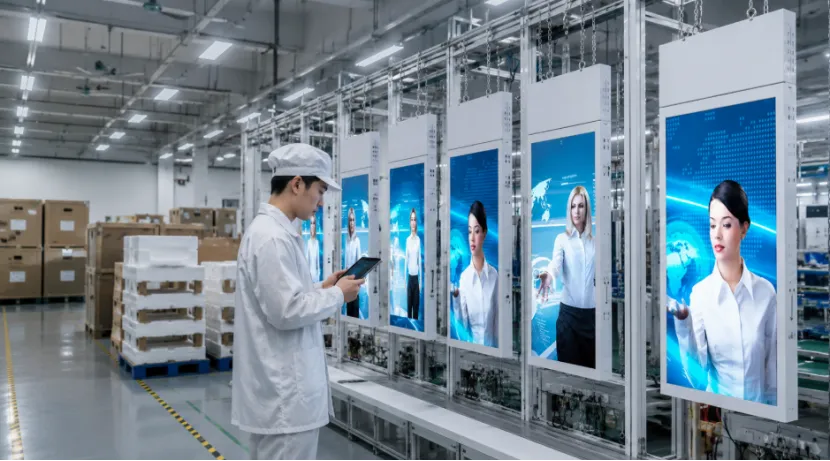
A ceiling-mounted LCD advertising display needs more attention than a wall-mounted screen. You are dealing with weight, hanging rods, power cables, and future service access. It is not the glamorous part of the project, but it is where many problems begin.
Ask for the hanging bracket for digital signage, installation drawing, hanging rod length, and digital signage installation height before production. Also check ceiling load capacity for digital signage with the building team. Cable management for digital signage should be planned early, especially when the screen sits in a high-end store or hotel lobby.
RSXD’s product page lists installation bracket and hanging structure options, interface options, multiple language settings, and OEM or ODM support for bulk orders. It also states that content can be updated through USB, network, or digital signage software, depending on the chosen system.
For export projects, confirm digital signage voltage requirements before production. A 110V 220V digital signage display setup, plug type, power cord, and certification documents should match the target market. Also ask about digital signage power consumption, especially if dozens of screens will run every day in a mall, airport, or retail chain.
A good-looking sample is not enough. For a bulk order digital signage display, you need stable production, safe shipping, and clear after-sales terms.
Ask about digital signage aging test, 48-hour aging test digital signage, factory inspection digital signage, and digital signage warranty.
RSXD’s knowledge base says finished products go through at least 48 hours of high-temperature aging tests, plus checks for brightness, contrast, color consistency, power stability, interface compatibility, structure strength, and heat dissipation. Each machine also receives one-machine-one-inspection before storage.
If you are buying for a brand, distributor, or contractor project, ask about OEM digital signage display and ODM digital signage display options. Common needs include logo customized digital signage display, custom LCD advertising display, custom interface digital signage display, system language, custom brightness digital signage, and custom digital signage packaging.
RSXD fits this type of project because it is a commercial LCD display manufacturer with R&D, production, customization, sales, and service capabilities. Its product range covers advertising machines, touch screen kiosks, LCD video walls, smart interactive boards, and customized display solutions.
The company’s knowledge base also describes its own production base, sheet metal, assembly, testing, aging lines, ISO9001 quality control, CE, FCC, and RoHS coverage. That makes it a practical choice when you need a custom commercial display solution, not just a screen in a box.
Check digital signage shipping packaging, shockproof packaging digital signage, moisture-proof packaging digital signage, accessories, cartons, wooden cases if needed, and packing lists. RSXD’s knowledge base says packaging uses foam cushioning, waterproof film, and reinforced outer cartons to reduce damage from collision and moisture.
For digital signage project delivery, ask about digital signage lead time, sample testing, installation guidance, and digital signage bulk order delivery. For larger orders, sample approval before mass production is not slow. It is usually the faster route in the long run.
Q1: What Should Buyers Check First Before Ordering a Hanging Double-Sided LCD Advertising Display?
A: Check the site first. Screen size, brightness, ceiling structure, installation height, power supply, and network method should be confirmed before price comparison.
Q2: Is Android or Windows Better for a Double-Sided LCD Advertising Display?
A: Android is suitable for standard ads, videos, images, and loop playback. Windows is better for special software, system connection, or more complex commercial projects.
Q3: Can Both Sides Show Different Content?
A: Yes. A double-sided LCD advertising display can show the same or different content if the system and playback software support it.
Q4: Why Is Packaging Important for Digital Signage Orders?
A: LCD screens can be damaged by pressure, moisture, or vibration during shipping. Shockproof and moisture-proof packaging helps reduce transport risk.
Q5: Can Buyers Request OEM or ODM Customization?
A: Yes. Common customization includes logo, size, brightness, system, interface, installation bracket, language, voltage, packaging, and content playback method.